One source of truth
Structure, content, and preview stay attached to the same node.
Personalised web funnels change as visitors answer questions, reach a score, or arrive from a
campaign. Once that logic grows, a small edit can affect several routes—and it becomes hard to
tell who will see what.
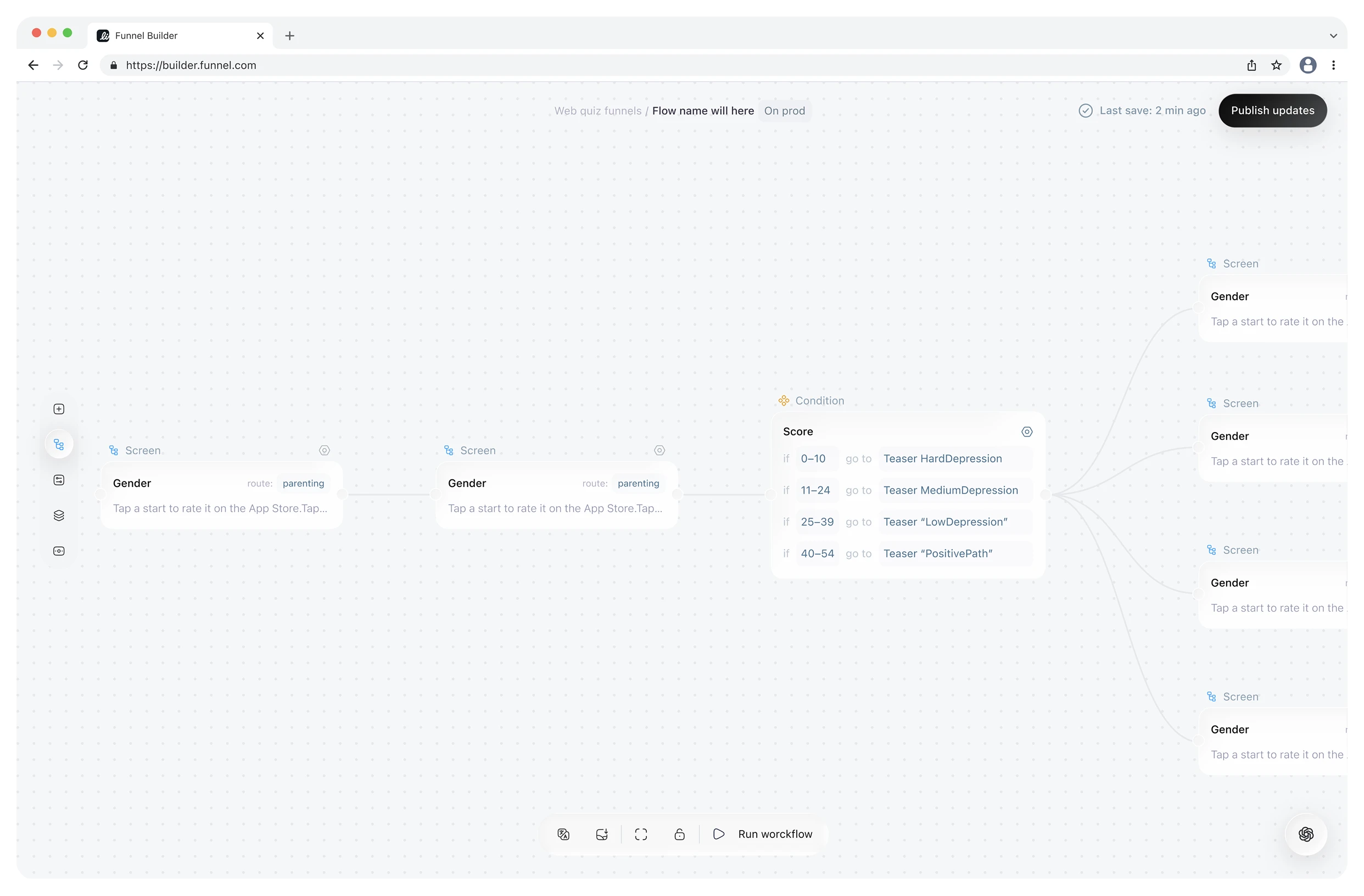
I designed a node-based workspace that keeps screens, branching rules, and live previews in one
connected map. Growth teams can shape paths quickly; designers can refine each screen without
losing the logic around it.
Growth work starts with the route: test a hypothesis, reuse a proven flow, and branch it for a new audience. Design work starts with the screen: hierarchy, copy, media, and the experience at a specific step.
I separated those modes without disconnecting them. The canvas holds the structure; selecting a node opens a focused editor for its content or rule, with a live preview beside it. Each role sees the detail it needs, while both work from the same journey.
 Last save: 2 min ago
Personalisation without duplicates
A condition can route by answer, score, entry point, plan, or profile. Teams tailor only the moment that needs to change, then reconnect visitors to the shared path.
Because the shared path stays shared, teams do not have to clone a whole funnel for one tailored moment. Every variation remains visible on the same canvas.
Context-aware assistant
The assistant already knows the selected flow, its nodes, and the project context. Instead of tracing the whole diagram by hand, a teammate can describe the outcome they need in natural language.
It can find, create, and reconnect the relevant branches—but the result never disappears into a black box. Every proposed change returns to the canvas as ordinary logic the team can inspect, refine, or undo.
Describe the outcome. The assistant maps the route and returns every edit to the canvas—visible, editable, and reversible.
How the system works
Screen nodes describe what a visitor sees; condition nodes explain why the route changes. Connectors can split, reconnect, and accept several incoming paths, so the diagram matches real funnel logic.
Selecting a screen opens its content and live preview. A condition opens a compact rule editor. Both editors keep the surrounding journey in view, so teams can move between structure and screen-level detail without losing context.
Structure, content, and preview stay attached to the same node.
Each editor exposes only the controls needed for that node.
The assistant speeds up navigation; the canvas remains the editable record.
One workspace, two modes of focus
Growth teams can map hypotheses, routes, and personalised branches without waiting on a rebuild. Designers can open any screen, adjust its content and presentation, and preview the result without losing the logic around it.